Set CDL class, route type, home-time preference, and date-posted first. These four filters cut irrelevant listings before you read a single job description. The trucking job market remains active: the Bureau of Labor Statistics reports a median annual wage for heavy and tractor-trailer truck drivers, with a projected yearly average of job openings through the mid-2030s. Platforms built for a specific niche, like UCEP for FedEx-related roles, make these filters even more precise.
TL;DR:
- Filtering by CDL class, endorsements, and route type first prevents the majority of irrelevant job listings from appearing.
- Using a zip radius of 25 to 50 miles helps target local or home-daily positions, while state filters are better for broader relocations.
- Applying within the first 72 hours of posting increases the chances of your application being reviewed early, especially for jobs posted early in the week.
- Terms like "short-haul exception" or "ELD required" in listings indicate specific schedule restrictions and compliance considerations.
- Creating separate saved searches for W2 and 1099 jobs ensures more precise results and better pay opportunities.
Table of Contents
- Priority filter checklist: CDL, endorsements, route, equipment, home-time
- Location and terminal filtering: zip radius, state, and terminal-based searches
- Date posted and application timing: prioritizing recency to get reviewed first
- Compliance and HOS-aware filtering: spotting short-haul and ELD signals
- ATS and keyword strategy: make your profile match carrier searches
- How to use UCEP to apply these filter tactics for FedEx-related roles
- Filter options based on desired pay rates or compensation ranges
- Experience level or driver qualifications filter
- Benefits and perks filters
- What I recommend when you have 10 minutes to find a high-fit job
- Set up a UCEP profile and save your search in minutes
- FAQ
- Sources
Priority filter checklist: CDL, endorsements, route, equipment, home-time
Your filter settings determine whether you see 40 relevant jobs or 4,000 irrelevant ones. Start with these five categories, in order.
CDL class separates Class A jobs (tractor-trailers, most long-haul and linehaul freight) from Class B jobs (straight trucks, local delivery, some dedicated routes). Setting this filter first removes a large share of mismatched postings immediately, since many boards mix both license types in a single feed.
Endorsements narrow results further. If you hold a Hazmat endorsement, filtering for it surfaces tanker and hazardous-materials freight that pays differently than dry van work. Doubles/triples endorsements matter mainly for specific regional lanes, so only filter for them if you actually want that freight.
Route type is the filter that predicts your home life. Local routes typically mean home daily. Regional routes usually mean home weekly. Over-the-road (OTR) routes can mean two to four weeks out. Dedicated routes run a fixed lane with a more predictable schedule, and team routes split driving between two people to cover more miles faster.
Equipment type (dry van, reefer, flatbed, tanker) affects both required skills and pay expectations. Flatbed and tanker work often pays more but demands additional certification and physical tasks like tarping or hooking up hoses.
Employment type separates W2 company driver postings from 1099 owner-operator or lease postings. Mixing these in a search wastes time, since the pay structure, equipment ownership, and tax treatment differ completely.
- Set CDL class and endorsements before anything else to eliminate the largest block of irrelevant results.
- Use route type to filter for your home-time goals, not just job title wording.
- Separate W2 and 1099 searches entirely rather than toggling between them.
For a breakdown of CDL classes and what each endorsement actually permits you to haul, see this CDL certification guide.
Pro Tip: Run two separate saved searches, one for W2 company jobs and one for 1099 contractor postings, since combining them buries the better-paying option under volume.
Location and terminal filtering: zip radius, state, and terminal-based searches
Nationwide OTR searches and local searches need different filter logic entirely. Treat them as two separate jobs, not one.
- Use a zip-code radius of 25 to 50 miles when you want a true local or home-daily job; wider radii start pulling in regional work disguised as local.
- Use state-level filters only when you are open to relocating or commuting across a larger area, since state filters return far more noise than radius filters.
- Search by terminal name or city when you want a specific home base, since terminal-based searches surface postings tied to an actual physical location rather than a vague "nationwide" tag.
Watch for ads labeled "local" that mention weekly mileage numbers in the thousands. A genuinely local job rarely needs to advertise mileage at all, since the appeal is being home every night, not running miles. When you see mileage language in a "local" post, treat it as regional or OTR and filter it out, or call the terminal directly to confirm the actual route before applying.
Date posted and application timing: prioritizing recency to get reviewed first
Recency filters change who reads your application first. Use the last 24 to 72 hours when you are actively applying, and the last 7 days when you are researching carriers or building a list of targets to watch.
Recruiters often review new applicants in the order they arrive, then recycle the same ad days later once interest slows. Applying within the first 72 hours puts you near the top of that review queue. One trucking recruiter resource notes that many postings go live early in the week, which affects when you should check your saved searches.
- Keep your CDL, medical card, and driving record ready to upload before you start applying.
- Have your most recent employer's contact information on hand for fast reference checks.
- Set a daily reminder to check new postings rather than waiting for a weekly batch.
Compliance and HOS-aware filtering: spotting short-haul and ELD signals
Job post language often hints at schedule reality before you ever talk to a recruiter. Search for terms like "short-haul exception," "150 air-mile," and "ELD required" to understand what a posting actually expects from your day.
The FMCSA Driver's Guide to Hours of Service outlines the 11-hour driving limit, the 14-hour on-duty window, and the 60/70-hour limits that govern most over-the-road schedules. A posting that mentions the short-haul exception usually means you return to your starting location each day and are exempt from certain logbook requirements.
The FMCSA Hours of Service page notes 2026 pilot programs, including the Flexible Sleeper Berth and Split Duty Period options, that may affect how some carriers structure driver schedules. These programs can mean more flexible rest breaks, but participation varies by carrier, so confirm directly with any employer advertising this flexibility before you apply.
ATS and keyword strategy: make your profile match carrier searches
Applicant tracking systems scan for exact phrasing, not general qualifications. Put your CDL class, endorsements, ELD experience, and HOS familiarity at the top of your resume or profile, not buried in a paragraph.
Match the exact phrases carriers use in their postings. If a job lists "Class A CDL, Hazmat endorsement, ELD experience required," use that same wording rather than a paraphrase like "experienced with electronic logs."
- List your CDL class and endorsements as the first line of your profile summary.
- Mirror job-posting phrasing exactly, including abbreviations like "OTR" or "P&D."
- Save multiple searches with slightly different keyword combinations to catch postings that use varied terminology for the same job.
Pro Tip: Carriers describe the same job differently. Save separate searches for "linehaul driver," "line haul driver," and "over-the-road linehaul" to avoid missing postings due to spacing or wording differences. For more on how job titles vary across the industry, see this guide to truck driver job titles.
How to use UCEP to apply these filter tactics for FedEx-related roles
UCEP organizes listings into three main categories: pickup and delivery, CDL-A solo linehaul, and CDL-A team linehaul. Each category maps directly to the route-type filter described earlier, so you start narrower than on a general job board.
To run an efficient search, set your CDL class and endorsements first, then choose your home-time preference by selecting pickup and delivery for daily home time or linehaul for longer routes. Add a recent date-posted filter, then save the search so new matches generate alerts automatically.
Because UCEP focuses exclusively on FedEx Service Provider roles, it reaches a targeted pool of FedEx-experienced drivers, which means fewer unrelated postings to filter out compared to a general board.
Filter options based on desired pay rates or compensation ranges
Pay filters work best as a range, not a single number, since posted pay often depends on mileage, load type, or experience tier. Set a minimum that reflects your actual floor, then leave the upper range open so you don't miss postings that pay more than expected but list a lower starting figure.
Be aware that some postings advertise per-mile rates while others list weekly or annual salary. Filtering by "annual salary" alone can hide strong per-mile postings that would outperform it on a busy week, and vice versa. When a board allows it, compare using a consistent unit, either converting everything to a weekly estimate or keeping per-mile and salary searches separate.
Sign-on bonuses sometimes appear as a separate line item rather than folded into the pay filter. If a platform supports a dedicated bonus filter, use it alongside your pay range rather than assuming the base pay filter captures bonus-heavy postings. A lower base rate with a strong sign-on bonus can outperform a higher base rate with none, especially in your first year with a carrier.

Experience level or driver qualifications filter
Experience filters protect you from wasting time on jobs that will reject your application at the screening stage. Most postings specify a minimum, commonly one or two years of verifiable driving experience, though some entry-level or company-sponsored training roles accept new CDL holders.
Filtering by years of experience also works in reverse: if you have five or more years behind the wheel, filtering for "experienced drivers" or setting a higher minimum helps you avoid training-focused postings that pay less or assign less desirable routes to newer hires.
Clean driving record requirements appear in almost every posting but rarely as a dedicated filter field. Instead, look for phrases like "clean MVR" or "no more than two moving violations in three years" within the job body, and keep your own driving record summary ready so you can confirm eligibility before applying rather than after a recruiter call.
Benefits and perks filters
Benefits filters let you separate postings by what actually affects your take-home value, not just the headline pay number. Sign-on bonuses, health insurance, and retirement plans vary widely between carriers, and a job board that lets you filter for these directly saves you from reading dozens of postings to find them.
Health insurance availability matters most for solo drivers without coverage through a spouse or other source, so filtering for "benefits included" or "health insurance offered" narrows the field quickly. Retirement plan filters, typically 401(k) matching, matter more for long-term career drivers than for seasonal or short-term work.
Sign-on bonuses deserve a second look beyond the filter itself. A large bonus paid in installments over a year behaves differently than one paid upfront, so once a filter surfaces bonus-eligible postings, read the payout structure before treating the bonus as guaranteed income.

What I recommend when you have 10 minutes to find a high-fit job
Set CDL class, route type, home-time, and last-72-hours date posted, in that order, then apply to the top three matches before doing anything else. Everything past that is refinement.
Before you accept an interview, call the terminal directly to confirm the home-time and HOS details match what the posting implied.
— Aaron
Set up a UCEP profile and save your search in minutes
Instead of scanning general job boards full of unrelated listings, UCEP keeps the search focused on FedEx Service Provider roles from the start. You set the same filters covered above, CDL class, endorsements, route type, and home-time, but every result already matches the FedEx-related category you're looking for.
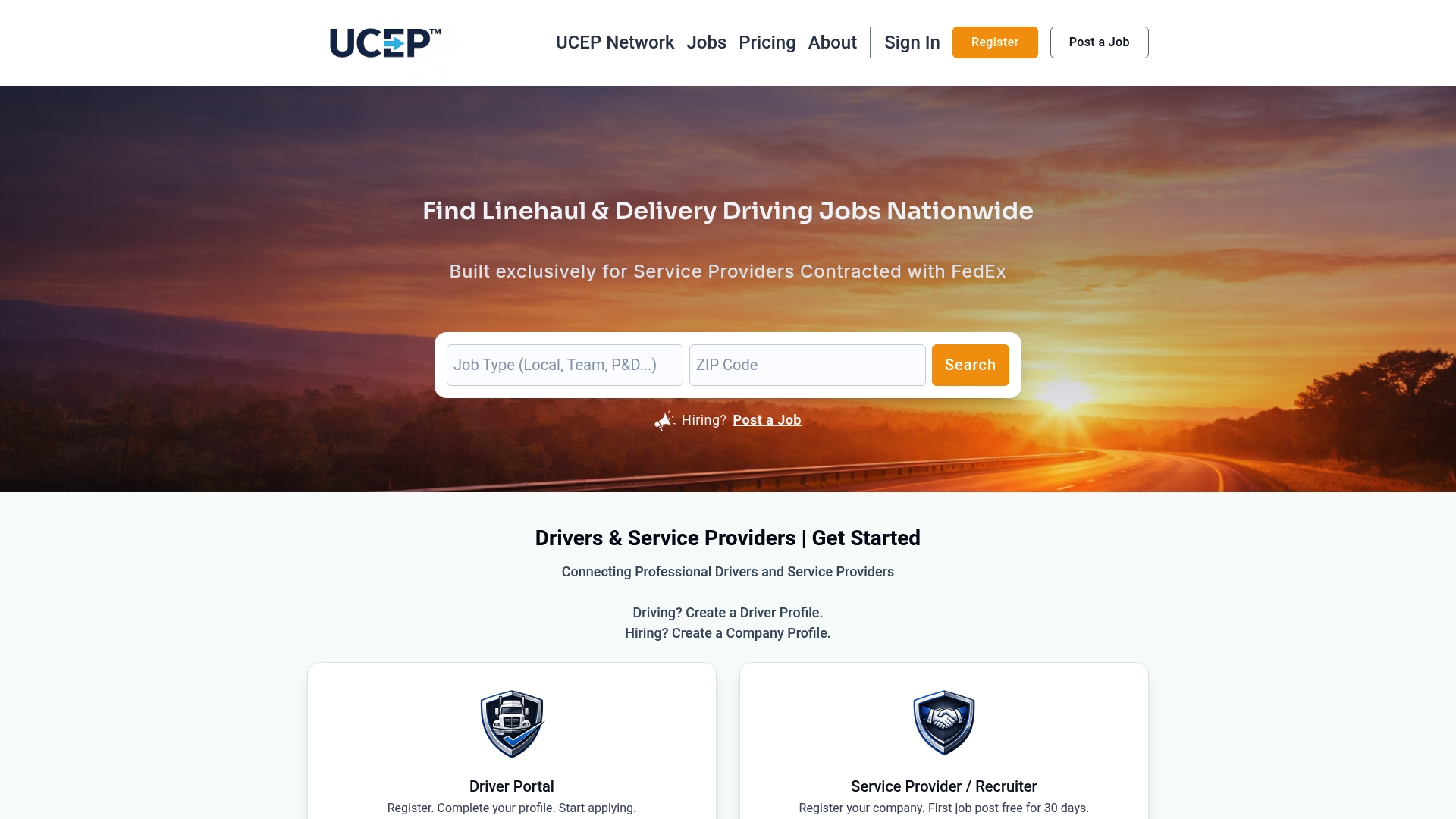
- Create a free profile and select your CDL class and endorsements.
- Set your route-type and home-time preferences, then add a date-posted filter.
- Save your search so new pickup and delivery, CDL-A solo, and CDL-A team linehaul postings generate alerts automatically.
Browse current openings on the UCEP jobs page, or check the pricing page if you're a Service Provider looking to post roles rather than apply to them.
FAQ
What CDL job can pay around $3,000 a week?
Weekly pay near that level is usually tied to team linehaul runs, hazmat or tanker endorsements, or owner-operator work with consistent freight, since these combine higher per-mile rates with more driving hours. The BLS reports a median annual wage of $57,440 for heavy and tractor-trailer truck drivers, so higher weekly pay reflects the upper range rather than the typical outcome.
What is the trucker's 70-hour rule?
The 70-hour rule limits drivers to 70 hours of on-duty time over 8 consecutive days, after which a driver must take 34 consecutive hours off duty before resetting the clock. Details on this limit and related HOS rules appear in the FMCSA Driver's Guide to Hours of Service.
Is trucking still worth it in 2026?
Trucking remains a viable career path, with the BLS projecting about 4% employment growth for heavy and tractor-trailer truck drivers through 2034 and roughly 89,300 annual openings nationwide. Seasonal hiring patterns also affect availability throughout the year, which this guide to seasonal hiring spikes covers in more detail.
Where do truck drivers typically look for jobs?
Drivers commonly use general job boards, carrier-run career pages, and niche platforms built around a specific employer network or freight type. Niche platforms like UCEP, which focuses on FedEx Service Provider roles, or route-focused tools covered in this comparison of route and listing platforms, can narrow results faster than a general search.
Sources
- Heavy and Tractor-trailer Truck Drivers : Occupational Outlook Handbook : U.S. Bureau of Labor Statistics
- Driver's Guide to Hours of Service (HOS) | FMCSA