
The fastest way to build an effective employer profile is to start with a proven template, add one dated proof point and one employee quote, then publish with a single, clear hiring call to action. You don't need a rewrite of your company history. You need a structure that candidates can scan in under a minute and a reason to click "apply."
TL;DR:
- Collect a genuine employee quote and a specific, dated metric to create a credible and engaging employer profile that resonates with candidates.
- Prioritize benefits and career pathways near the top of the profile, ensuring candidates quickly find pay, growth opportunities, and work-life details.
- Use authentic storytelling, visuals, and a single clear call to action to improve engagement and effectiveness of the employer profile.
- Focus on answering candidates' key questions about the work environment, benefits, and advancement opportunities, especially in specialized fields like driving or logistics.
- Promote the profile across multiple channels and track metrics like click-throughs and applications to refine and improve the recruitment messaging over time.
Table of Contents
- What Are the Best Employer Profile Examples to Learn From?
- Key Takeaways Before You Start Writing
- What Is an Employer Profile and How Is It Different From a Company Profile?
- The Must-Have Elements Every Employer Profile Needs
- 8 Employer Profile Examples Worth Studying
- Which Templates Should You Use to Build One Fast?
- How to Write and Publish an Employer Profile in Five Steps
- How UCEP Helps FedEx Service Providers Build Driver-Focused Profiles
- What Actually Matters When You Sit Down to Write One
- Sources
What Are the Best Employer Profile Examples to Learn From?
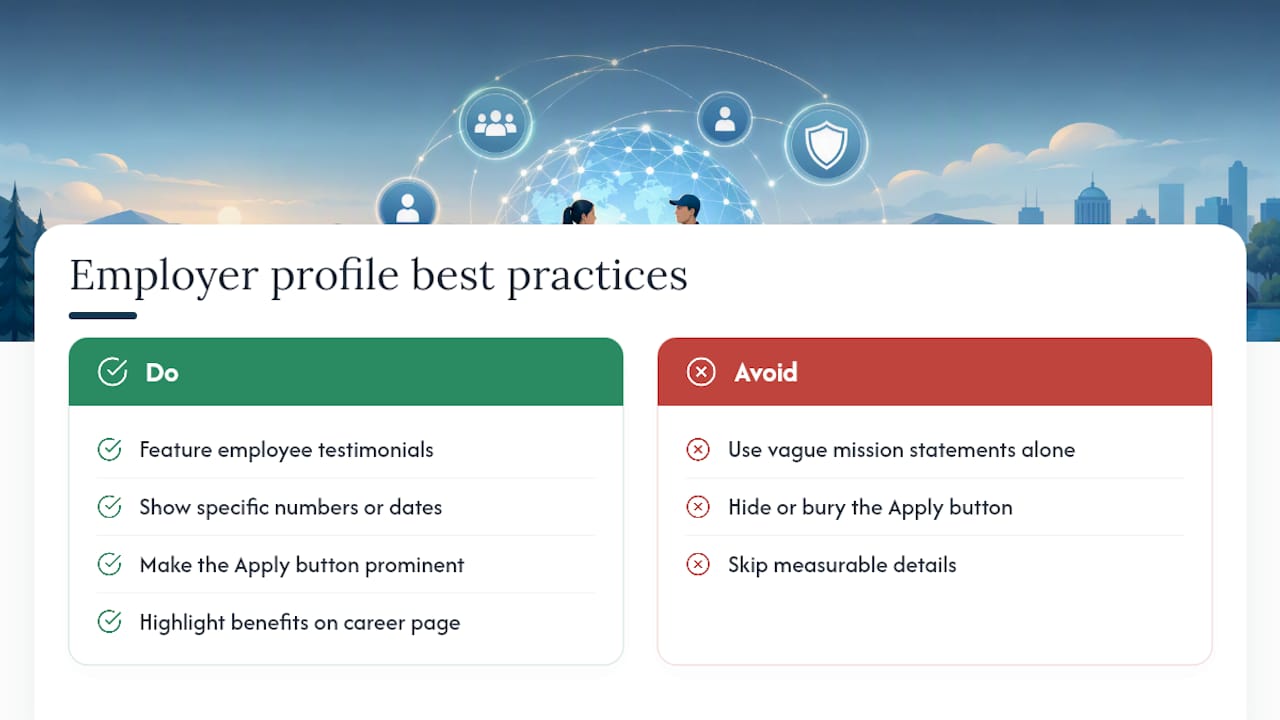
Before you build anything, it helps to know which parts of an employer profile actually move candidates to apply. Starbucks, HubSpot, Ikea, Google, Salesforce, and Philips all approach this differently, but they share three habits: they let employees speak for the culture, they show a number or a date instead of a vague claim, and they never bury the "apply" button.
Employer branding works because it shapes how job seekers and current employees perceive the company before, during, and after the hiring process. The strongest examples rely on testimonials, career pages, and visible benefits rather than mission statements alone. That's the model this article breaks down: what to include, which companies do it well, where to find templates, and how to publish one this week.
Key Takeaways Before You Start Writing
You don't need every section perfect on day one. You need the sections that candidates actually read.
- Authenticity beats polish. A short employee quote outperforms a paragraph of corporate language every time.
- Metrics need dates. "500 open routes as of January 2026" reads as real. "Hundreds of opportunities" reads as filler.
- One CTA, not five. Every profile should point toward a single next action, usually "apply" or "view openings."
- Benefits go near the top. Candidates scan for pay, schedule, and growth path before they read anything else.
If you're starting from zero, gather three things this afternoon: one employee story (a quote, a short video clip, or even a two-sentence testimonial), one or two measurable facts about your team or openings, and a clean list of benefits. That's enough to draft a working profile before your next hiring push.
What Is an Employer Profile and How Is It Different From a Company Profile?
A company profile describes the business, its products, its history, and its market position, usually written for customers, investors, or partners. An employer profile describes what it's like to work there, written for job seekers. The distinction matters more than it sounds. Practitioners in the field draw a clear line: employer profiles prioritize employee experience, career pathways, and social proof, while company profiles lean on revenue figures, product lines, and leadership bios.
You can see the difference in what each document answers. A company profile answers, "What does this business do?" An employer profile answers, "What would it be like to work here, and what do I get?"
That doesn't mean you need two entirely separate documents. If your company profile already includes a strong culture section, you can extract and expand it into a standalone employer profile without starting over. But if your existing "About Us" page is all product specs and founding dates, you need a dedicated page built specifically for candidates. This matters most for career site examples that get linked from job postings. A candidate who clicks through from a driver job listing wants to see pay, routes, and equipment. They don't want your quarterly earnings summary.
For hiring in specialized fields, like commercial driving or logistics, this separation is not optional. Generic "About Us" copy rarely answers a driver's real questions: home time, equipment age, dispatch structure, pay per mile. A dedicated employer profile can.
The Must-Have Elements Every Employer Profile Needs
A strong employer profile follows a predictable structure, but the content inside each section is where most companies fall short. Here's what belongs on the page, in roughly the order candidates expect to see it.
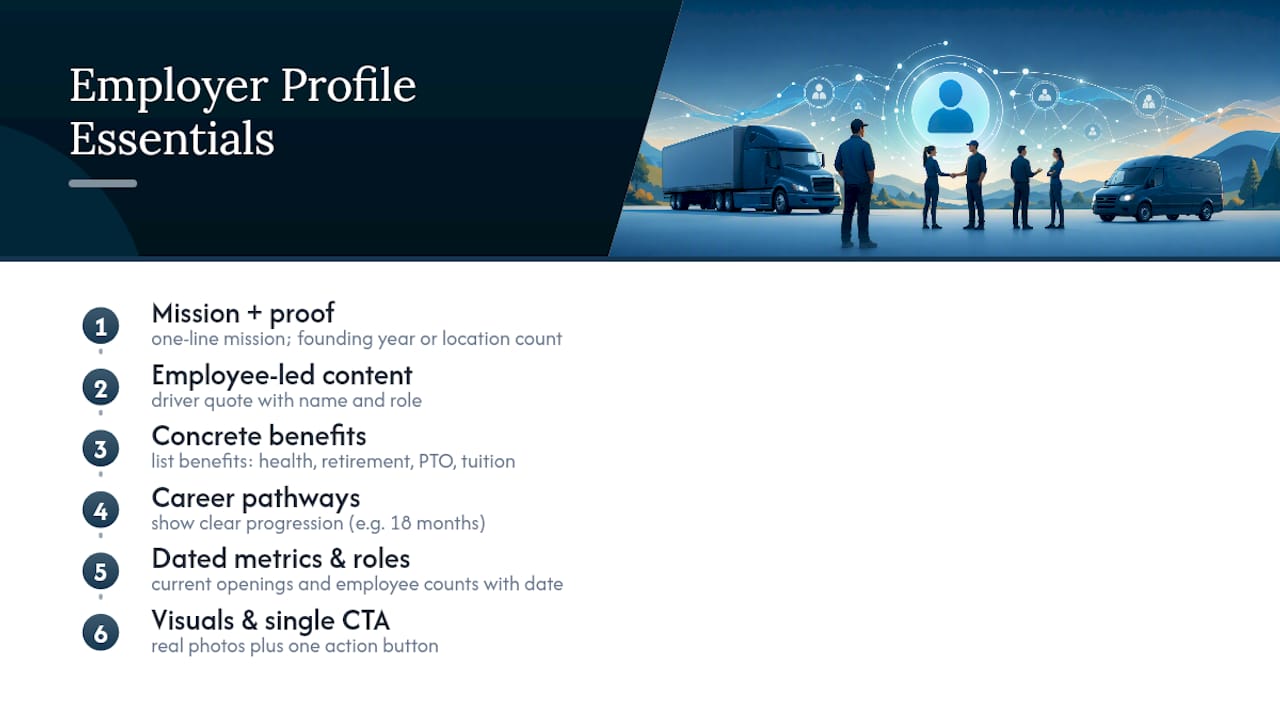
A mission headline with one line of proof. Skip the paragraph of values language. State what the company does and back it with a single concrete detail, like a founding year, a location count, or a customer number.
Employee-led content. This is the single highest-impact section on the page. A quote from a current driver, technician, or team lead, ideally with a name and role, does more work than three paragraphs of leadership messaging. AIHR's review of employer branding tactics found that authentic, human-centered storytelling consistently outperforms generic corporate language, and employee-led posts tend to read as more credible than anything written by a marketing team.
Concrete benefits and career pathways. List actual benefits: health coverage, retirement match, paid time off, tuition assistance. Then show a path forward, like "dispatcher to terminal manager in 18 months," rather than a vague "room to grow."
Dated metrics and role counts. "42 open CDL-A positions as of this month" or "1,200 employees across 14 terminals" gives candidates a sense of scale and urgency that "growing team" never will.
Visuals and a clear CTA. Photos of real facilities and real people beat stock imagery. And every profile needs exactly one action button: apply, view openings, or contact recruiting.
Pro Tip: If you only have time to fix one thing on an existing profile, replace your "About the Company" paragraph with a 20-second employee video or a two-sentence quote. That single swap tends to lift engagement more than any other single change.
8 Employer Profile Examples Worth Studying
These examples span industries and company sizes, but each one demonstrates a tactic you can copy without copying their budget.
1. Starbucks: Social Responsibility Paired With Real Benefits
Starbucks leans on partner (employee) benefits like tuition coverage and healthcare eligibility for part-time staff, framed alongside its sustainability and community commitments. The lesson here: pairing a values statement with a specific, checkable benefit makes the values feel earned rather than performative. Replication tip: pick one benefit that's genuinely unusual for your industry and lead with it.
2. HubSpot: Transparent Remote Work Policy and Content-Led Careers Pages
HubSpot publishes its culture code and remote work guidelines in detail, treating the careers page like a piece of content rather than a static form. Candidates know exactly what "remote" and "hybrid" mean before they apply. Replication tip: write out your actual schedule and location policy in plain language instead of the word "flexible."
3. Ikea: Interactive Recruiting That Reaches Younger Candidates
Ikea ran a recruitment campaign inside Roblox, and the results were hard to ignore: roughly 220 million impressions and 178,032 job applications from a single interactive campaign aimed at younger job seekers. Most companies won't build a game, but the underlying lesson holds: meet candidates on the platforms they already use. Replication tip: if your target hires are under 30, test a short video or social-native format before defaulting to a static job post.
4. Google: Multi-Channel, Day-in-the-Life Storytelling
Google's careers content spans video interviews, team spotlights, and detailed role breakdowns across multiple channels, giving candidates a sense of daily work rather than a job title alone. Replication tip: film one five-minute "day in the life" clip with an actual employee, even on a phone camera, and post it to your careers page.
5. Salesforce: Hiring Tied to Social Impact
Salesforce connects its hiring pitch to its 1-1-1 philanthropic model, framing employment as connected to broader impact work. Candidates who care about mission-driven employers respond to this kind of framing when it's backed by specifics. Replication tip: if your company supports a cause or community program, name it and quantify it. Vague goodwill doesn't land.
6. Philips: Multimedia-Led Storytelling Over Text
Philips uses video and team-focused multimedia content to humanize its employer brand, following a pattern shared by companies like Notion and Google that use multimedia to explain the "why" behind the work. Replication tip: replace one text-heavy section of your profile with a short photo gallery or embedded video.
7. A Small-Business Example: Career Development Messaging as a Filter
Smaller employers that succeed at this often use career development messaging and leadership principles as a hiring filter, telling candidates upfront what kind of employee thrives there, which reduces mismatched applications. Replication tip: write a short "who thrives here" paragraph. It repels bad-fit applicants as effectively as it attracts good ones.
8. A Creative-Industry Example: Career Pages Built Around Candidate Questions
Career pages that lead with growth paths, benefits, and proof points, rather than a generic "about us" narrative, consistently outperform product-focused pages because they answer what candidates actually search for. Replication tip: open your careers page with the three questions every candidate asks (pay, growth, day-to-day work) instead of a company history.
Which Templates Should You Use to Build One Fast?
You don't need a design team to publish a professional employer profile. A handful of free and low-cost templates cover most of what you need.
- Piktochart offers layout templates built specifically for company and employer profile design, which speeds up formatting for teams without an in-house designer.
- Bizplanr provides a free downloadable company profile template in Google Docs, Word, and PDF formats, covering overview, mission, values, and contact sections. It's a solid starting structure even when you're adapting it for candidates instead of customers.
- HubSpot's own template library includes careers-page and culture-document formats that pair well with its transparent-policy approach covered above.
For roles that need hands-on orientation, like driver positions, adapt whichever template you choose by adding a dedicated section for equipment type, route structure, and home time. These details matter more to a driver candidate than almost anything else on the page. Whatever template you pick, keep the formatting simple enough to survive a copy-paste into your applicant tracking system, and test the final layout on a phone screen before you publish. Most job seekers browse on mobile first.
How to Write and Publish an Employer Profile in Five Steps
Building the profile is only half the job. Publishing and measuring it is what makes the effort pay off.
- Prepare your material. Collect two or three metrics (headcount, open roles, years operating), one employee quote or short video, and a handful of real photos from your workplace.
- Draft the page. Write a headline that states what you do, a two-sentence mission with proof, a benefits list, a career pathway example, and one CTA button.
- Review for accuracy and voice. Check that every claim is current, confirm you have permission to use employee names and quotes, and cut any language that sounds written by a committee.
- Publish and promote. Place the profile prominently on your careers page and share it through social channels and any job boards you use for recruiting.
- Measure performance. Track career page click-through rate and applications per listing weekly for the first month, then monthly after that.
Recruiters who track retention-focused metrics beyond the first application tend to catch profile problems faster, since a profile that generates clicks but few qualified applicants usually needs a benefits or pay-transparency fix, not a redesign; improving diversity hiring in UK security companies can also enhance candidate quality and retention How to improve diversity hiring in UK security companies|SJB.
How UCEP Helps FedEx Service Providers Build Driver-Focused Profiles
This platform is designed specifically for Service Providers contracted with FedEx, allowing employer profiles to focus directly on driver priorities rather than generic corporate messaging.
- Profile management tools enable listing benefits, home time, and route types aligned with various commercial driving roles.
- Directories provide candidates with resources to research operations before applying.
- Applicant tracking systems and targeted alerts help connect qualified candidates with open positions.
Pro Tip: Use the career pathway fields to show progression, like moving from solo to team routes or from pickup and delivery into linehaul, since drivers researching a new employer often ask about advancement before they ask about pay.
You can see these fields in action on live employer profiles like JAR Trucking Inc., and pair your profile strategy with recruiting guidance built for the industry, including team driver recruiting strategies for CDL-A hiring.
What Actually Matters When You Sit Down to Write One
Most employer profiles fail for the same reason: they're written to impress a board, not to answer a candidate's questions. The companies covered above, from Ikea's Roblox experiment to Salesforce's impact framing, all succeed because they lead with something specific and verifiable, not because they wrote more words. If you take one thing from this article, take this: collect one real employee quote and one dated metric before you write a single line of mission copy. Everything else can follow a template. Those two things can't be templated, and they're what candidates actually remember.
— Aaron