
Employer profile verification confirms your company is a legitimate FedEx-contracted Service Provider or recruiting agency, and it does one thing immediately: it puts a verified badge on your UCEP company profile. That badge tells drivers your listing is real. You’ll need business registration documents, a corporate domain email, and EIN or tax paperwork to get it.
TL;DR:
- Verification requires official business documents, a corporate domain email, and proof of a FedEx service relationship to ensure legitimacy.
- Submissions are processed within one to five business days, but mismatched names, unreadable scans, or generic emails often cause delays or rejections.
- Maintaining an active verification badge involves updating details promptly and monitoring email and profile information for accuracy.
- Verified profiles attract more applications, reduce scam reports, and help prevent brand misuse, making ongoing verification efforts worthwhile.
- Different platforms have varying verification depths, with industry-specific sites demanding more targeted proofs, especially for FedEx-related service providers.
Table of Contents
- Why Verification Matters for FedEx Service-Provider Recruiters
- The Verification Checklist: What UCEP Checks Before Approving Your Profile
- How Do You Submit Verification on UCEP?
- Why Was My Verification Rejected or Delayed?
- Keeping Your Verified Status Active Over Time
- What Happens to Your Data During Employer Profile Verification?
- Does Every Job Board Verify Employers the Same Way?
- What UCEP Has Learned From Verifying Service Providers
- Start Verifying Your Company Profile on UCEP
- Sources
Why Verification Matters for FedEx Service-Provider Recruiters
Drivers researching linehaul, CDL-A, and pickup-and-delivery jobs are wary of fake postings, and for good reason. Freight recruiting has a scam problem, and verified employer badges are the fastest way to signal you're not part of it.
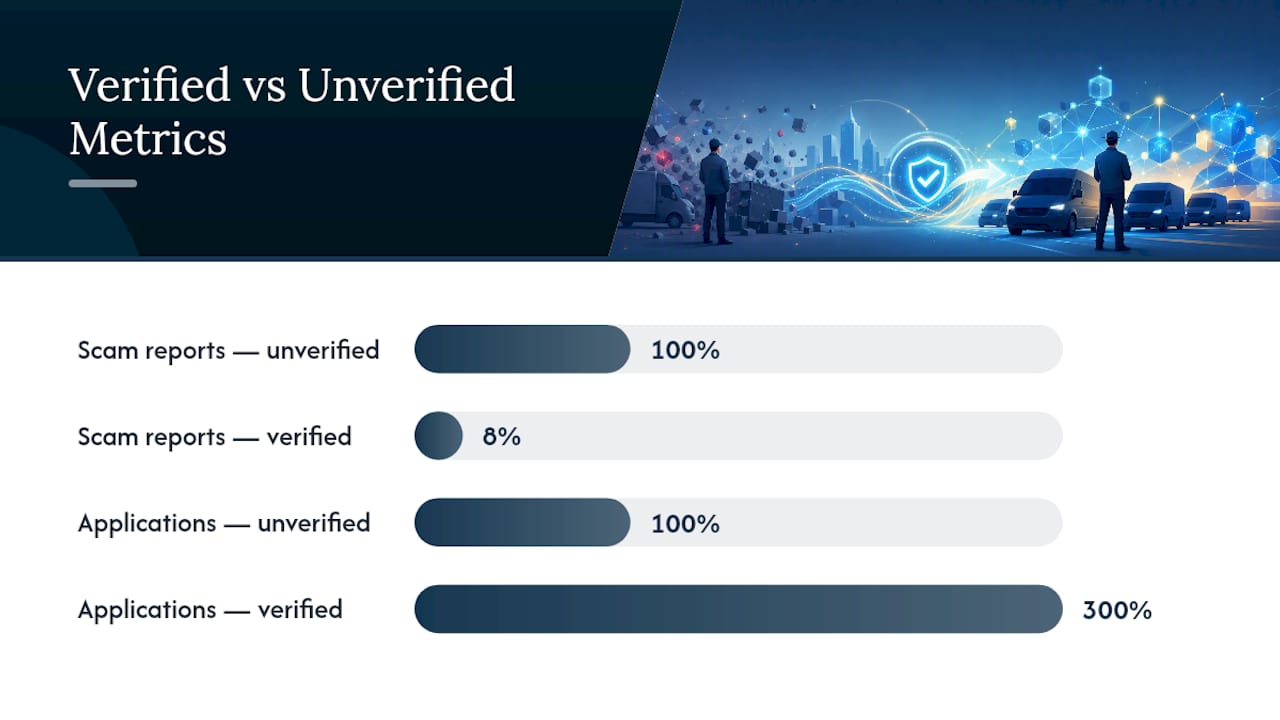
Platform-published figures show verified employers see roughly 92% fewer scam reports and about three times the application volume compared with unverified listings on comparable networks. That gap isn't marginal. It's the difference between a job posting that gets ignored and one that gets a full applicant pipeline.
Verification does more than build driver trust. It also protects your company name from misuse, since confirming business registration and corporate email ownership prevents unauthorized parties from posting under your brand. For FedEx-contracted operations specifically, verification supports the due diligence drivers already do before applying, things like confirming a terminal address exists or a company is actually running FedEx freight.
What a verified badge does for your listings:
- Signals to drivers that your company identity has been confirmed, not just claimed
- Reduces the volume of "is this real" messages your recruiters have to answer
- Separates your postings from unverified or duplicate listings on the same terminal
The Verification Checklist: What UCEP Checks Before Approving Your Profile
UCEP and comparable job boards run through a defined set of checks before a company profile earns its verified badge. Knowing the list ahead of time saves you a rejected submission and a second round of uploads.
- Business registration or formation documents. Articles of incorporation, LLC formation paperwork, or a state business license that names your legal entity.
- Corporate domain email. An email address on your own company domain, not a Gmail, Yahoo, or Outlook.com account. This is the single check that trips up the most first-time submissions.
- EIN or tax documentation. Your employer tax ID confirms you're an operating business, not a shell entity.
- Proof of FedEx service-provider relationship. Terminal assignment paperwork, a service agreement excerpt, or other operational documentation tying you to FedEx-related freight.
- A contactable representative. A working phone number tied to a real person who can confirm the company's operations if UCEP's team follows up.
- Optional supporting evidence. Insurance certificates, workers' compensation coverage, or existing employee references strengthen a submission but aren't always required.
Each item exists to confirm both parts of employer profile verification at once: the company is legally real, and the person submitting the profile actually works for it. Business registration and EIN documents prove the entity exists; the corporate email and contact phone number help demonstrate the submitter's authority to represent it.
Pro Tip: Gather all your documents into one folder before you start the online form. Submissions rejected for a missing EIN or an unreadable scan almost always come from uploading files one at a time under time pressure.
How Do You Submit Verification on UCEP?
The verification path starts in your company settings, not on the general profile editor. Here's how the submission works from start to finish.
Where to start. Log into your UCEP dashboard and go to company settings, then locate the verification tab. That's where you'll find the document upload path rather than the general profile fields.
How to prepare your files. Scan documents as PDF or PNG, keep file sizes reasonable, and make sure text is legible at full zoom. If you're uploading more than one document, add a short cover page listing what's included. This one step cuts down on reviewer back-and-forth significantly.
What fields you'll complete:
- Legal company name, matching your registration documents exactly
- EIN or tax ID number
- Terminal or operating address
- Corporate domain email address
Match these fields to your public business records precisely. A mismatch between "ABC Logistics LLC" on your profile and "ABC Logistics" on your registration is a common cause of delay.
What happens after you submit. A typical review workflow runs through submission, document review, and badge activation within one to five business days once everything checks out. You'll get a confirmation message when the submission is received, and a second notification when a decision is made. Check your dashboard's verification tab for status updates in the meantime rather than resubmitting.
When to escalate. If you're past the five-business-day window with no update, contact UCEP support directly and reference your submission date. Don't submit a duplicate application. That only adds a second file to the review queue and slows things down further.
Why Was My Verification Rejected or Delayed?
Most rejected submissions trace back to a handful of repeat offenders, and nearly all of them are fixable in one pass.
- Name mismatch. Your legal name on the profile doesn't match your registration documents word for word.
- Generic email domain. Submitting from a Gmail, Yahoo, or other free email provider instead of your company domain is one of the fastest ways to trigger manual review or rejection.
- Unreadable scans. Low-resolution photos or heavily compressed PDFs that blur small text.
- Missing EIN. Documentation that proves the business exists but not that it's a taxed operating entity.
The fixes are straightforward: rescan documents at higher resolution, switch to a corporate email address before resubmitting, and attach a secondary document, like a signed contract excerpt or a terminal utility bill, if your primary proof is thin.
If you need to open a support ticket, include your order or submission ID, a screenshot of the rejection note, and your corrected file names. Pro Tip: Rename files before uploading them the second time (e.g. "ABC-Logistics-EIN-2026.pdf" instead of "scan001.pdf"). Reviewers process clearly labeled resubmissions faster than unlabeled ones. While your profile is under re-review, your existing listings typically stay live but may show a pending status rather than the verified badge.
Keeping Your Verified Status Active Over Time
Verification isn't a one-time checkbox. Badges tied to platform networks can be revoked when subscription status lapses or suspicious activity gets reported, so staying verified takes a little ongoing maintenance.
- Update your legal name, billing details, or terminal address as soon as anything changes, not months later.
- Keep your corporate email address active and monitored. A bounced verification email is a common reason badges lapse without anyone noticing.
- Maintain accurate listing details, including your logo, terminal locations, and phone number, so applicants aren't confused by outdated information.
- Report impersonation immediately if you spot a competing listing using your company name or logo.
- Set an annual reminder to review your posted jobs and confirm your documentation is still current, since platforms may periodically re-check older profiles.
Keeping a folder of your verification documents on hand, rather than digging through email when a re-check comes up, saves your team real time every time this happens.
What Happens to Your Data During Employer Profile Verification?
Submitting business registration paperwork, tax documents, and contact details naturally raises the question of who sees that information and how long it's kept. This is a fair concern, and it deserves a direct answer rather than a vague one.
Document review is typically handled by a platform's verification team, not published publicly. Your EIN, formation documents, and internal contact details support the verification decision itself; they aren't displayed on your public company profile. What does appear publicly is limited to what you choose to show: company name, terminal locations, job listings, and the verified badge itself.
That said, you should treat every document you upload as sensitive business information. A few practices reduce your exposure:
- Redact anything not needed for verification, like unrelated financial figures on a tax document, before uploading.
- Use your platform's built-in upload path rather than emailing documents to a support inbox, since dashboard uploads are typically logged and access-controlled in ways email attachments aren't.
- Confirm you're uploading to the correct company account, especially if your agency manages multiple client profiles.
- Ask your recruiting agency's compliance team whether EIN or formation documents need any internal retention policy applied after submission.
None of this should discourage you from submitting real documentation. Verification simply doesn't work without it. The point is to treat the upload process with the same care you'd apply to any other business document exchange, and to use the platform's dedicated upload tools instead of ad hoc email threads.
Does Every Job Board Verify Employers the Same Way?
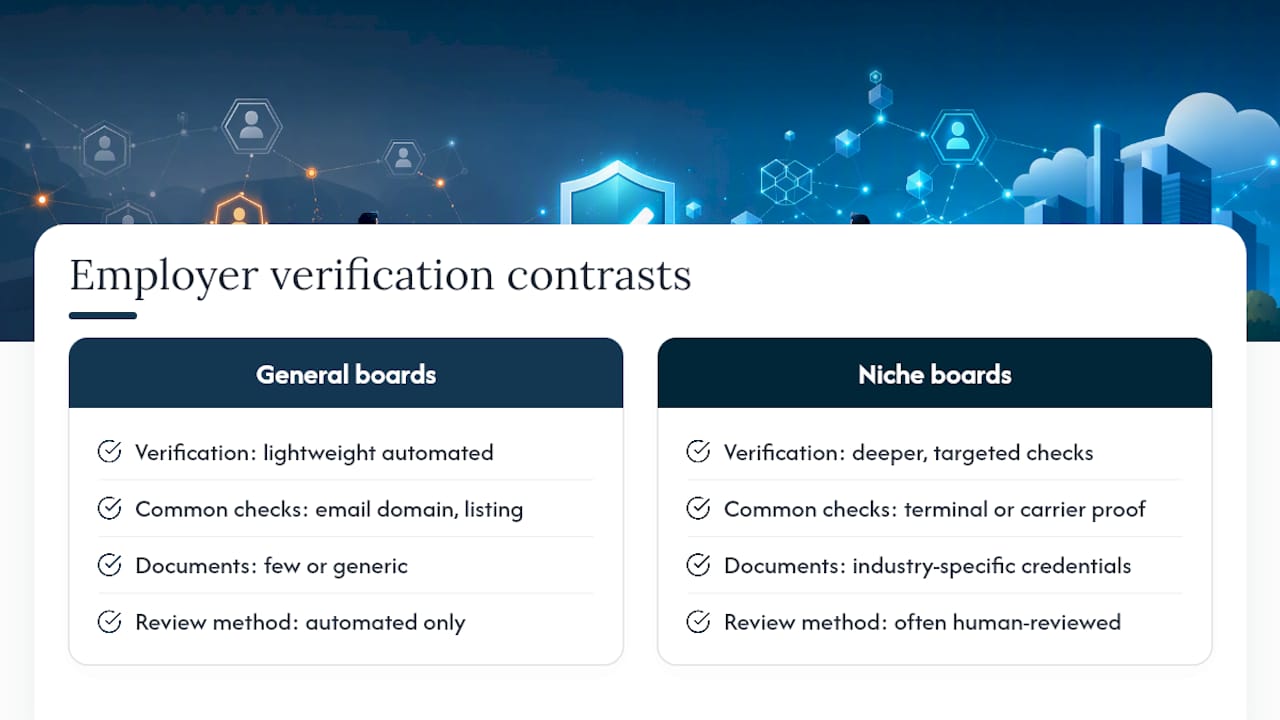
No, and the differences matter if you're posting across multiple platforms. Large general job boards often run lightweight automated checks, confirming a working email domain and a basic business listing, because they process enormous volumes of postings and can't manually review every employer.
Niche or industry-specific platforms tend to go deeper. A logistics-focused board reviewing a linehaul contractor is more likely to ask for terminal documentation or proof of a carrier relationship than a general-purpose board would, since the entire audience cares whether that relationship is real. Some platforms complete verification in a single automated pass; others route submissions to a human reviewer, which adds a day or two but catches mismatches automated checks miss.
The document types also shift by industry. A moving or freight company might be asked for compliance and operating credentials specific to that trade, while a driving-focused platform may ask about safety and background documentation tied directly to the roles being filled. None of this is arbitrary. Verification requirements scale with how much a platform's core audience needs to trust that a specific type of employer is who they claim to be.
For FedEx-contracted Service Providers, that means a platform built around your industry will ask more targeted questions than a general job board would, and that's a feature, not friction. It's also why comparing hiring platforms before you commit budget to job postings is worth the hour it takes.
What UCEP Has Learned From Verifying Service Providers
Working inside FedEx-contracted hiring for any length of time makes one thing obvious: drivers have gotten sharper about spotting fake postings, and recruiters who skip verification pay for it in application quality, not just volume.
UCEP's employer directories and profile management tools exist because a driver comparing five linehaul openings will favor the listing that looks operationally real over the one that doesn't. Verification, paired with resources like UCEP's guidance on pre-employment screening and recruiting red flags, gives Service Providers a fuller picture of who they're hiring and who's hiring from them.
The pattern worth watching: verified profiles tend to draw applicants who've already done their homework, which shortens the screening conversation on both sides.
— Aaron
Start Verifying Your Company Profile on UCEP
UCEP is built specifically around FedEx-contracted hiring, so verification here isn't a generic add-on. It's tied directly to the directories, terminal listings, and applicant tracking tools you're already using to fill CDL-A and linehaul roles.
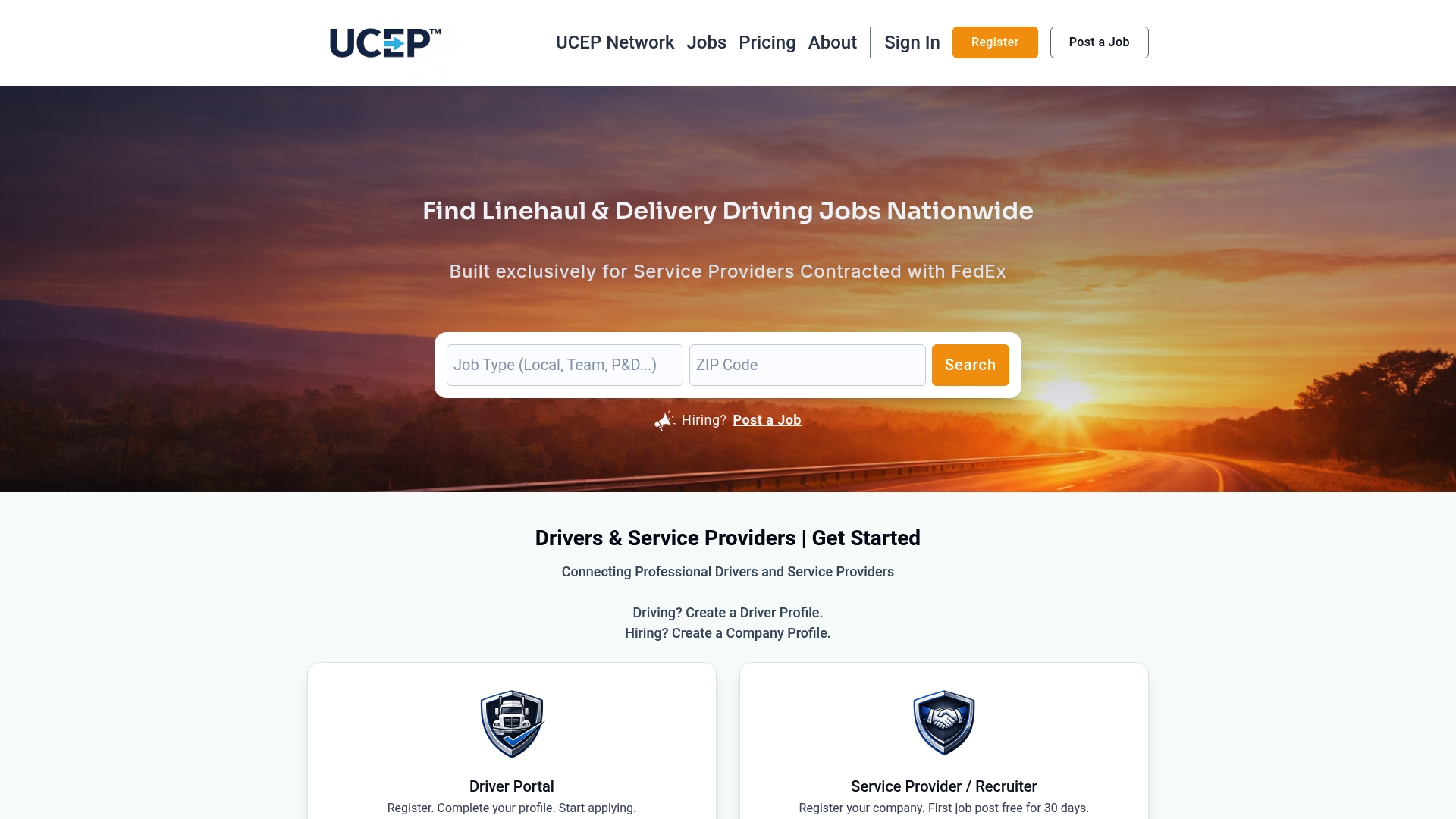
Getting started takes less time than most recruiters expect. Company settings walks you through the document checklist, and once your profile is verified, you can see exactly what a completed listing looks like by browsing example company pages like Source Logistics Inc or VAS Logistics Inc. Both show how terminal details, logos, and contact information display once a profile is fully built out.
If you're weighing plan tiers, a free trial listing lets you test the platform before committing to a paid plan, and upgrading typically speeds up how quickly your verification submission gets reviewed. Check out Four Leaf Recruiting's live listing or Revolution Recruiting LLC's profile for a sense of what a fully built, verified company page looks like in practice. From there, head to your UCEP dashboard and start your verification submission today.
Sources
- The Benefits of Being a Verified Employer – Expertini ATS Resources
- How JobBob’s Employer Verification Protects Your Brand
- Employer/company profile help — Metaintro